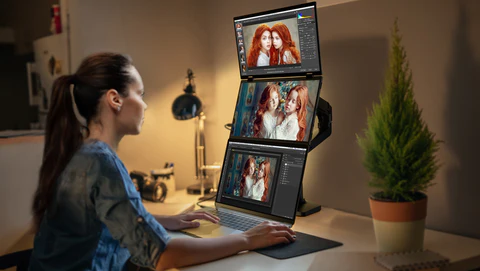
Foldable monitors are becoming increasingly popular among professionals, gamers, and digital nomads who need flexibility without compromising on performance. Whether you work remotely, travel often, or want a portable secondary screen, a foldable monitor can improve productivity and convenience. But not all foldable monitors are made equal. Before you invest, it’s essential to understand the key features that matter the most.
- What Is a Foldable Monitor?
- Why Consider a Foldable Monitor?
- Key Features to Check Before Buying a Foldable Monitor
- 1. Screen Size and Resolution
- 2. Display Panel Type
- 3. Fold Mechanism and Build Quality
- 4. Connectivity Options
- 5. Power Source and Battery
- 6. Device Compatibility
- 7. Adjustable Stand and Viewing Angles
- 8. Touchscreen Support (Optional)
- 9. Weight and Portability
- 10. Price and Warranty
- Who Should Buy a Foldable Monitor?
- Common Mistakes to Avoid
- Conclusion
- Frequently Asked Questions (FAQs)
This guide will help you make an informed decision, highlighting everything you need to know before purchasing a foldable monitor.
What Is a Foldable Monitor?
A foldable monitor is a portable display designed to fold or collapse for easy storage and transport. Unlike traditional monitors, these devices are slim, lightweight, and often come with protective cases or stands. Many models connect seamlessly to laptops, smartphones, tablets, and gaming consoles, offering flexibility for various tasks.
Why Consider a Foldable Monitor?
Foldable monitors offer several benefits:
-
Portability: Easy to carry in a backpack or laptop bag
-
Productivity: Ideal for dual-screen setups
-
Quick Setup: Minimal cables required
-
Space-saving: Perfect for small desks or shared workspaces
-
Versatile Compatibility: Works with multiple devices
These advantages make foldable monitors a smart choice for freelancers, content creators, office workers, and students.
Key Features to Check Before Buying a Foldable Monitor
1. Screen Size and Resolution
Screen size matters for both portability and usability. Most foldable monitors range from 13 to 17 inches. Smaller monitors are easier to carry, while larger screens offer better multitasking and viewing comfort.
Resolution is equally important. Look for at least Full HD (1920×1080). For sharper visuals and detailed work, 2K or 4K resolutions are ideal, though they may consume more power.
Tip: Choose a screen size based on your usage rather than just portability.
2. Display Panel Type
The type of panel affects color accuracy, contrast, and viewing angles:
-
IPS panels: Excellent color reproduction and wide viewing angles
-
OLED panels: Deep blacks and vibrant colors but more expensive
-
TN panels: Budget-friendly but limited color and viewing angles
For most users, an IPS panel provides the best balance between quality and price.
3. Fold Mechanism and Build Quality
Durability is crucial for foldable monitors. A weak hinge or low-quality materials can lead to damage over time.
Look for:
-
Smooth folding mechanism
-
Scratch-resistant screen
-
Protective case or cover
A sturdy design ensures your monitor lasts longer, especially if you travel frequently.
4. Connectivity Options
A foldable monitor should support multiple connectivity options:
-
USB-C: Provides both power and video with one cable
-
HDMI: Standard for laptops, desktops, and consoles
-
Mini DisplayPort: For certain professional devices
USB-C is the most convenient, minimizing cable clutter and simplifying setup.
5. Power Source and Battery
Some foldable monitors draw power directly from your laptop or device, while others include a built-in battery.
Benefits of a built-in battery:
-
Portability without relying on external power
-
Ideal for on-the-go work
However, monitors with batteries may cost more. Consider how often you’ll use the monitor away from a power outlet.
6. Device Compatibility
Before purchasing, check that the monitor works with your devices:
-
Windows and macOS laptops
-
Smartphones (check if supported)
-
Gaming consoles like PlayStation or Xbox
Not all foldable monitors support smartphones, so confirm compatibility before buying.
7. Adjustable Stand and Viewing Angles
A flexible stand is important for comfort and ergonomics. Many foldable monitors allow for vertical and horizontal adjustments, perfect for reading, coding, or presentations.
A stable and adjustable stand reduces neck and eye strain.
8. Touchscreen Support (Optional)
Some foldable monitors feature touchscreens. While useful for designers or presenters, they:
-
Consume more power
-
Add to the cost
If you don’t need touch functionality, a standard screen is sufficient.
9. Weight and Portability
Portability is the main advantage of foldable monitors. Ideally, the monitor should weigh less than 2 pounds and easily fit into a backpack.
Also, consider the thickness when folded for easy storage.
10. Price and Warranty
Prices vary depending on brand and features. Set a budget and compare models within your range.
Check for:
-
At least a 1-year warranty
-
Reliable brand reputation
Avoid extremely cheap models without proper warranty or support.
Who Should Buy a Foldable Monitor?
Foldable monitors are ideal for:
-
Remote workers and freelancers
-
Students and online learners
-
Gamers who travel
-
Business professionals who multitask
If you frequently need extra screen space or work on the move, a foldable monitor is a smart investment.
Common Mistakes to Avoid
-
Ignoring screen resolution and panel quality
-
Buying without checking device compatibility
-
Choosing models with weak build quality
-
Overpaying for unnecessary features
Careful research ensures you get value for your money.
Conclusion
A foldable monitor is more than just a portable screen—it’s a productivity tool that can transform how you work and play. By focusing on screen quality, build durability, connectivity, compatibility, and portability, you can find a model that suits your daily needs perfectly.
Investing in a high-quality foldable monitor not only saves desk space but also enhances multitasking and efficiency. Choose wisely, prioritize durability, and your foldable monitor will provide years of convenience and performance, making your setup more flexible, efficient, and enjoyable.
Frequently Asked Questions (FAQs)
1. Are foldable monitors suitable for daily use?
Yes. High-quality foldable monitors are designed for everyday use, offering durability and consistent performance.
2. Can a foldable monitor replace a regular monitor?
For most users, yes. However, for professional editing or heavy gaming, a full-size monitor may still be preferable.
3. Do foldable monitors work with smartphones?
Some models do, depending on the monitor’s compatibility and the smartphone model.
4. Is USB-C sufficient to power a foldable monitor?
Most modern foldable monitors use USB-C for both power and video signals, making it convenient for minimal cables.
5. Are foldable monitors worth the investment?
Yes, especially for users who value portability, productivity, and flexible workspace setups.